

Every September, the mood outside changes faster than the mood on our screens. The light gets lower and softer, the mornings turn crisp, and people start reaching for sweaters and warm mugs. Meanwhile, the phone in your pocket is still running the same bright summer wallpaper, the same neon icons, and the same alarm that sounds like a fire drill. You probably look at that screen more than you look at any single object in your home, which makes it one of the easiest places to bring the season indoors. The trick is doing it in a way that feels calm instead of cluttered.
That is the idea behind the seven-point checklist below. It is not about downloading a dozen apps or spending an afternoon fiddling with settings. It is about a handful of small, deliberate changes that make your phone feel like part of the season rather than a distraction from it. If you have ever wanted your device to match the fall aesthetic you are trying to build in the rest of your life, this is the place to start. Everything here works on any modern phone, takes under an hour in total, and costs nothing.
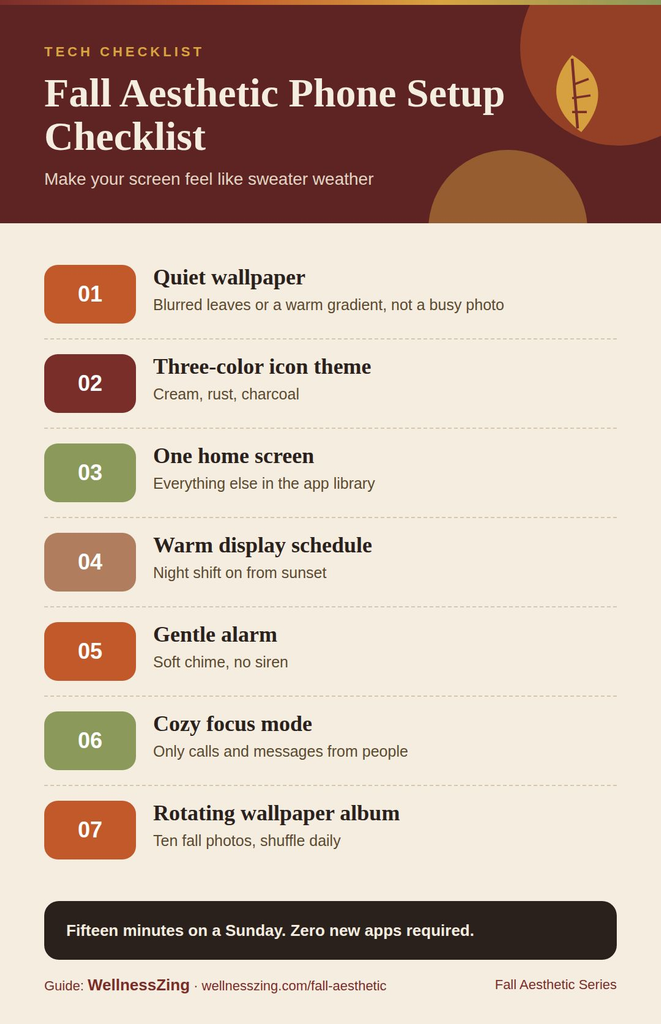
The infographic above condenses the whole setup into seven checkboxes, and it is worth walking through them in order because each one builds on the last. The first point is a quiet wallpaper: a single, low-contrast image that does not compete with your icons or your attention. The second is a three-color icon theme built from cream, rust, and charcoal, which is enough variety to look intentional and little enough to look restful. The third is a single home screen, meaning one page of apps you actually use and nothing else within a swipe.
The fourth checkbox on the chart is a warm display schedule that begins at sunset, so your screen shifts toward amber tones as the daylight fades. The fifth is a gentle alarm, one that eases you into the morning instead of jolting you out of it. The sixth is a cozy focus mode, a saved profile that silences the noise during the hours you want to protect. The seventh and final point is a rotating wallpaper album of ten photos, which keeps the quiet wallpaper from going stale by cycling through a small, curated set of autumn images. As the infographic shows, none of these steps depends on buying anything. The rest of this article takes each item and explains how to do it well.
1. Choose a quiet wallpaper
A quiet wallpaper is the foundation of the entire checklist, and it is the step most people rush. The word “quiet” is doing real work here. It does not mean boring, and it does not mean a plain color. It means an image with soft edges, gentle gradients, and no sharp focal point in the areas where your icons or clock will sit. Think of a blurred stretch of orange leaves, a fogged window with a single warm light behind it, a close crop of a knit blanket, or the texture of a wooden table with a mug slightly out of frame.
The easiest test is to set the image, lock your phone, and glance at the screen from across the room. If your eye lands on the time and then relaxes, the wallpaper is doing its job. If your eye bounces around trying to figure out what the picture is, choose something simpler. Photos you have taken yourself often work better than downloaded ones because they are already a little imperfect, and imperfection reads as calm. If you shoot your own, take them on an overcast day and crop tightly so the subject becomes a texture rather than a scene.
2. Build the three-color icon theme
Icon themes are where a fall aesthetic phone setup usually goes wrong, because it is tempting to make every icon a different shade of orange and brown until the screen looks like a pile of leaves. The infographic keeps it to three colors on purpose: cream, rust, and charcoal. Cream is your light neutral and should cover most of the icons. Rust is the accent, reserved for the handful of apps you open with pleasure rather than habit, such as your camera, your notes, or your music. Charcoal is the anchor, used for utilities like settings, calendar, and messages so they recede into the background.
Most phones now let you tint icons directly in the home screen settings, and where that is not available, you can create simple shortcuts with custom images in a few minutes. Keep the icon shapes consistent, use the same font for any labels, and resist adding a fourth color even if a particular app seems to beg for it. The three-color rule works because your eye can sort three groups instantly. Add a fourth and you are back to visual noise. If you want a tiny bit of variation, adjust the warmth of the cream slightly across rows rather than introducing a new hue.
3. Commit to one home screen
This is the checkbox that changes behavior, not just appearance. One home screen means one page of icons and widgets, with everything else living in your app library or search. The point is not minimalism for its own sake. It is that a single, deliberate page turns your phone into a tool you pick up for a reason, rather than a slot machine you swipe through looking for something to do.
Start by counting the apps you opened yesterday. For most people that number is far smaller than the number of apps installed. Put those daily apps on the home screen, arrange them in your three-color groups, and move everything else off the page. Add one widget at most, ideally a clock or a small calendar in charcoal that sits inside the quiet part of your wallpaper. Then give it a week. The first two days feel strange because you keep swiping to pages that are no longer there. By day four, the strangeness becomes relief. The phone feels lighter, and you start to notice how often you were reaching for it without a purpose.
4. Set a warm display schedule from sunset
The fourth point on the checklist is the one with the most immediate physical effect. Nearly every phone has a built-in setting that shifts the screen toward warmer, amber tones, and nearly every phone lets you schedule it. The checklist recommends tying that schedule to sunset rather than a fixed hour. In fall, sunset moves earlier every week, and a schedule that follows it means your screen warms up as the sky does, without you ever thinking about it.
Turn the warmth setting to the strong end of the range rather than the subtle end. A subtle shift is easy to ignore, and the whole point is that the screen should feel like lamplight after dark, not daylight. Pair this with lowering your brightness manually in the evening, because auto-brightness tends to keep screens brighter than a dim room really needs. If your phone also offers a grayscale or reduced-color option, consider scheduling that for the last hour before bed. A warm, slightly dim, slightly muted screen is dramatically less magnetic than a bright one, and that is exactly what you want when the season is asking you to slow down.
5. Pick a gentle alarm
Autumn mornings are darker, and waking up in the dark to a harsh alarm is one of the least cozy experiences a phone can deliver. The gentle alarm on the checklist is a simple swap: replace the default tone with something that starts quietly and builds. Many phones include ambient or nature sounds for exactly this purpose, and most let you set the alarm to fade in over thirty seconds or so rather than starting at full volume.
Choose a sound with no sharp attack. Soft bells, a low hum, rainfall, or a slowly rising chord all work. Avoid anything that resembles a notification, because you do not want your brain to associate waking up with a message arriving. Set the volume so that the first few seconds are barely audible and the last few are clearly enough to rouse you. If you share a room, a gentle alarm also happens to be far kinder to the person next to you. And if you wake before it goes off most days, that is a sign the rest of your evening routine is working.
6. Create a cozy focus mode
Focus modes, sometimes called do-not-disturb profiles, are one of the most powerful features on any phone and one of the least used. The checklist suggests building one specifically for the evening and naming it something that reminds you of its purpose. Call it Cozy, or Evening, or Lamplight. The name matters more than it seems, because you will see it every time you turn it on, and a small ritual of switching it on at dinner becomes part of how the evening starts.
Inside the mode, allow calls from a short list of people who genuinely matter, silence everything else, and hide notification badges so the red dots do not pull at you. Many phones let a focus mode also swap your home screen, so you can pair Cozy with an even sparser page: just your music, your reading app, your camera, and a clock. Schedule it to switch on automatically at the same time your warm display begins, and to switch off after your gentle alarm in the morning. Done this way, the phone essentially changes personality with the light. During the day it is a tool. After sunset it becomes something closer to a lantern.
7. Set up a rotating album of ten photos
The final checkbox solves the one weakness of a quiet wallpaper, which is that even a beautiful image becomes invisible after a week. The solution is a rotating album of exactly ten photos. Not fifty, because a huge album becomes random and you lose the curated feel. Not three, because they cycle too fast. Ten is enough to feel fresh for the whole season and small enough that you can choose each image on purpose.
Build the album from your own shots where possible: a mug on a windowsill, a stretch of wet pavement under orange trees, a candle flame, a stack of books, the corner of a scarf. Keep all ten consistent with your quiet wallpaper rule, so that any of them could sit behind your icons without fighting for attention. Set the phone to shuffle the album daily or hourly, whichever you prefer, and revisit it once a month to swap out any image you have stopped noticing. The team at WellnessZing put together a full guide to the season, including a whole section on fall wallpapers and the three phases of autumn, and it is a useful reference when you want your ten photos to shift from the bright leaves of early October to the bare branches and lamplight of late November.
Putting the checklist together
Taken one at a time, none of these seven steps is dramatic. A softer wallpaper, three colors, one page, a warmer screen, a quieter alarm, a saved focus profile, and ten photos on rotation. Taken together, they change what it feels like to pick up your phone. The device stops shouting and starts matching the room. Your evening screen glows like a lamp, your morning starts with a sound instead of a siren, and the single page of cream, rust, and charcoal icons reminds you, every time you unlock it, of the season you are trying to enjoy. That is the whole promise of a fall aesthetic phone setup: not a prettier screen for its own sake, but a small, daily cue that helps the rest of your life slow down along with the light. Work through the checklist over a quiet weekend, keep what feels good, and let the phone follow the season for once instead of ignoring it.
