

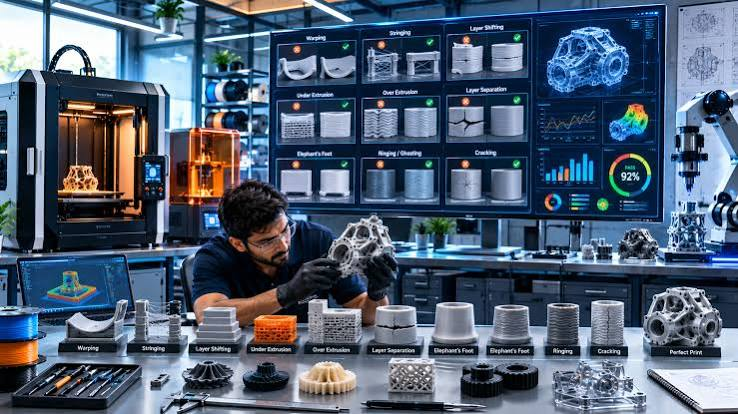
3D printing has moved well beyond prototyping labs and hobbyist workshops. Today, it operates inside manufacturing plants, engineering firms, dental practices, aerospace suppliers, and educational institutions. In environments where output consistency matters and downtime carries real cost, a malfunctioning printer is not a minor inconvenience — it is a workflow disruption that can stall production schedules, delay client deliverables, and erode confidence in an otherwise reliable process.
What makes 3D printer maintenance particularly demanding is that these machines sit at the intersection of mechanical precision, thermal control, and software coordination. When something goes wrong, the failure often has multiple contributing causes. A print that looks like an adhesion problem might actually stem from a worn extruder gear or an improperly calibrated build plate. Diagnosing correctly before acting is what separates a fast recovery from repeated failed prints and wasted material.
This article walks through the ten most common problems encountered in professional 3D printing environments and explains how experienced technicians approach each repair — not just the fix, but the reasoning behind it.
Understanding the Diagnostic Framework Before Any Repair Begins
Experienced technicians rarely start a repair by replacing parts. Before touching hardware, they observe. A well-structured diagnostic process involves running a controlled test print, examining the failed output under consistent lighting, and cross-referencing the result against known failure signatures. This approach is documented in professional 3d printer repair protocols and forms the foundation of the 3d Printer Repair guide that many service professionals reference when working across multiple machine platforms.
The value of this framework is that it prevents confirmation bias — the tendency to fix what is most visible rather than what is actually broken. A technician who sees stringing on a print and immediately adjusts retraction settings may be treating a symptom caused by a partially blocked nozzle or moisture-contaminated filament. Structured diagnosis first, intervention second.
1. Bed Adhesion Failures
Bed adhesion failure is one of the most frequently reported problems in both desktop and industrial 3D printing. It occurs when the first layer does not bond reliably to the build surface, causing the print to shift, warp, or detach mid-process. The consequences range from a single failed print to repeated production losses if the root cause is not identified.
Why This Happens and How It Is Repaired
Adhesion failures typically trace back to one of three areas: build plate levelness, nozzle-to-bed distance, or surface contamination. A plate that is even slightly uneven creates inconsistent first-layer compression. If the nozzle is too high, the filament does not press into the surface firmly enough. If the surface is contaminated with oil from handling or residue from previous prints, bonding is compromised regardless of other settings. Professional repair involves re-tramming the bed to achieve uniform height across the full print area, recalibrating the Z-offset precisely, and cleaning the build surface with an appropriate solvent before returning the machine to service.
2. Nozzle Clogs and Partial Blockages
Nozzle clogs are common across all filament types but are particularly persistent when abrasive or composite materials are used regularly without corresponding maintenance. A partial clog is often more difficult to identify than a full blockage because the printer continues to operate while producing inconsistent extrusion that only becomes visible in the finished part.
The Repair Process for Clogged Nozzles
Professionals use a combination of cold pull technique and thermal cycling to clear most blockages. A cold pull involves heating the nozzle to a specific temperature, feeding material through, then cooling and withdrawing it sharply to extract debris. For more severe clogs, the nozzle is removed entirely and cleaned chemically or replaced if internal degradation is found. The choice between cleaning and replacement depends on the material of the nozzle itself and the degree of wear on the internal bore.
3. Layer Delamination
Layer delamination refers to the separation of individual print layers, which compromises the structural integrity of the part. It is most commonly observed in taller prints or parts with significant cross-sectional variation between layers. In functional applications — brackets, housings, mechanical components — a delaminated part is unusable.
Identifying the Cause Before Adjusting Parameters
The primary causes include insufficient extrusion temperature, excessive print speed, inadequate layer adhesion due to environmental temperature fluctuation, or moisture in the filament. Professionals distinguish between these causes by examining where delamination begins in the print. If it appears consistently at a certain height, environmental factors such as cooling drafts are likely. If it is random and distributed, material quality or moisture content is examined first. Filament that has absorbed moisture, as noted in material science literature including resources maintained by the National Institute of Standards and Technology, can degrade significantly during the extrusion process, producing weak inter-layer bonds.
4. Extruder Grinding and Slipping
When the extruder gear grinds against the filament rather than driving it forward, the filament surface becomes damaged and the printer loses consistent material feed. This produces under-extrusion artifacts in the print and, in severe cases, a complete feed failure. The sound of the gear clicking or grinding is usually the first indication something is wrong.
What Professional Repair Involves
Technicians inspect the extruder gear for wear, remove any accumulated filament debris from the gear teeth, and check the idler arm tension. A spring or tension arm that is too loose allows the filament to slip; one that is too tight can damage the filament surface before it even reaches the heat zone. Gear replacement is necessary when teeth are visibly rounded or when cleaning does not restore consistent grip. This is a relatively low-cost repair that has a significant impact on print reliability.
5. Stringing and Oozing Between Travel Moves
Stringing occurs when the print head moves across an open area and deposits thin threads of melted material between features. The result is a part covered in fine filament hairs that require post-processing to remove. In parts with tight tolerances or fine surface requirements, stringing can make a print unusable without extensive cleanup.
Root Causes and Targeted Fixes
The most common contributors are inadequate retraction settings, high nozzle temperature relative to the material being used, and slow travel speeds. A professional approach to 3d printer repair for stringing involves testing retraction length and speed incrementally while holding all other variables constant. If stringing persists after retraction optimization, the technician will examine whether the nozzle is partially blocked, causing pressure buildup that releases during travel moves.
6. Warping on Large or Flat Parts
Warping is the upward curling of print edges or corners during or after printing. It results from differential thermal contraction — the outer edges of a part cool and contract faster than the interior, creating internal stress that lifts the part from the build surface. It is particularly common with materials that have high shrinkage rates.
Repair and Prevention in Professional Settings
Enclosing the print environment to maintain consistent ambient temperature is the most reliable structural fix. On open-frame machines, professionals add draft shields to the print file or adjust part orientation to reduce the exposed surface area of the first few layers. Build surface selection also matters — certain surfaces provide better retention of specific materials at elevated temperatures.
7. Print Head Crashes and Z-Axis Errors
A print head crash occurs when the nozzle makes unexpected contact with the part or build surface during a move. This can damage the nozzle, displace the print, or in some cases bend the Z-axis lead screw or carriage assembly. These crashes are often caused by failed homing sequences, debris on the build surface, or a part that has partially detached and lifted into the print path.
Mechanical Assessment After a Crash
After any significant crash, technicians inspect the full motion system before resuming operation. This includes checking the lead screws for straightness, verifying that all linear rails or rods are free of debris, and confirming that the carriage moves without binding across the full range of motion. Running a print immediately after a crash without inspection risks compounding the damage.
8. Inconsistent Extrusion and Under-Extrusion
Inconsistent extrusion shows up in prints as uneven layer widths, gaps in the surface, or a rough texture that should be smooth. Under-extrusion specifically refers to a condition where the printer deposits less material than required, leaving visible gaps in the structure. Both conditions affect part quality and strength.
Tracing the Source of the Problem
This issue sits at the intersection of several systems: the extruder drive, the hotend temperature stability, the filament diameter consistency, and the PTFE tube condition. Experienced 3d printer repair technicians work through each variable systematically. A partially degraded PTFE liner, for example, can create friction that impedes consistent filament flow without being immediately visible during inspection.
9. Hotend and Thermal Runaway Errors
Modern 3D printers include thermal runaway protection — a safety system that shuts the machine down when the hotend temperature deviates beyond an acceptable range. This protection exists because uncontrolled heating is a fire risk. When this error triggers, it requires a proper diagnostic review rather than simply a firmware reset.
What Technicians Check in Thermal Runaway Cases
The most common causes are a failing thermistor, a damaged heater block, a loose cartridge heater, or a wiring fault between the hotend and the control board. Each of these has a distinct failure signature. A loose heater cartridge will show erratic temperature readings that spike and drop. A failing thermistor tends to report temperatures that are consistently offset from actual values. Replacing the correct component — rather than all of them — is what separates an effective repair from an expensive one.
10. Firmware and Calibration Drift Over Time
This is the least dramatic but often most overlooked problem in maintained 3D printing environments. Over time, firmware updates, user parameter changes, and physical wear on motion components cause a gradual drift in print quality. What was once a well-calibrated machine begins producing parts that are dimensionally slightly off or exhibit surface artifacts that were not present previously.
Restoring Baseline Performance
Professional 3d printer repair for calibration drift involves returning the machine to a known baseline state. This means verifying steps-per-millimeter values for each axis, re-running bed leveling and probe offset procedures, and in some cases flashing a clean firmware build to eliminate accumulated parameter changes. Regular calibration audits — scheduled rather than reactive — are the most effective way to prevent this kind of slow degradation from reaching the point where it affects production output.
Closing Thoughts
3D printer failures are rarely as simple as they appear on the surface. A single symptom can have several different causes depending on the machine, the material, the environment, and the history of use. What distinguishes professional repair from trial-and-error troubleshooting is a structured approach to diagnosis, a willingness to trace problems to their origin rather than their most visible expression, and the discipline to verify a fix before returning the machine to production.
For organizations that depend on 3D printing as part of their workflow — whether for rapid iteration, end-use part production, or tooling — the cost of repeated failures goes well beyond material waste. It affects project timelines, resource allocation, and the broader reliability of a process that should be an asset. Understanding how experienced technicians approach these problems, and when to call on professional 3d printer repair services rather than attempting internal fixes, is a practical decision that has real operational consequences.
The ten problems covered in this article represent the majority of what goes wrong in real-world 3D printing environments. None of them are unsolvable, but all of them benefit from a methodical, informed approach — one that treats the printer as a precision system rather than a device to be reset and restarted until the output looks acceptable.
